


Financial reporting is about more than just numbers on a spreadsheet—it’s about translating data into actionable insights. For finance professionals and business owners alike, Microsoft Dynamics 365 Finance (D365 Finance) provides a robust suite of tools to streamline financial reporting, improve precision, and empower decision-making.
Boyer and Associates are the reporting experts. We’ve helped many businesses implement and use D365 Finance to get the insights they need out of their data to make better business decisions. Read on and then contact our team to get the reporting tools you are missing.
Why Choose D365 Finance for Financial Reporting?
Financial reporting is often complex, but with D365 Finance, it’s been made a bit easier, thanks to:
- Built-in Financial Reports: Out of the box, D365 Finance comes equipped with a comprehensive suite of default financial reports. These reports align with your ledger setup and can be used as-is or easily customized to meet your organization’s unique needs.
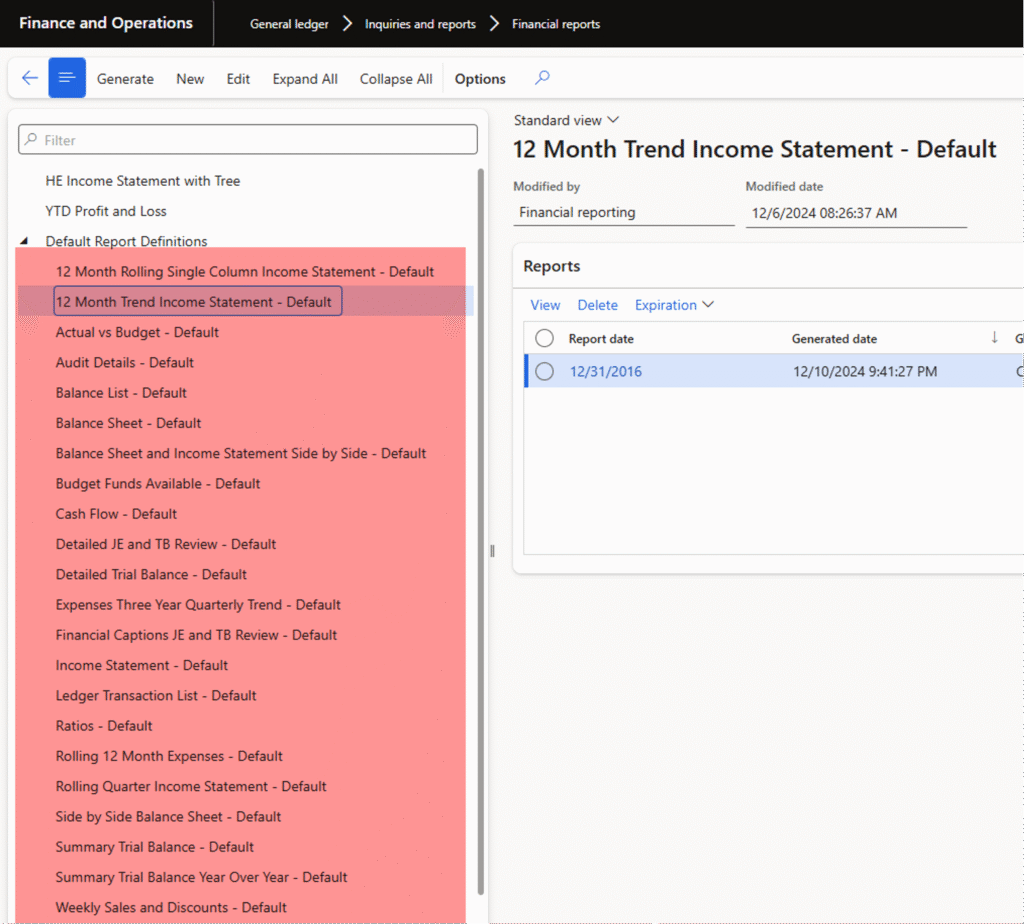
- Real-Time Data: Reports immediately reflect both posted and unposted transactions, ensuring that users always work with the most current data.
- Configurability: Whether you’re creating entirely new reports or modifying existing ones, D365 Finance makes it simple to tailor your financial reporting to fit your business processes.
But that’s just the beginning. Let’s break down what makes D365 Finance a game-changer for financial reporting across organizations.
Key Features of Financial Reporting in D365 Finance
1. Self-serve reporting
One of the standout features of D365 Finance is its self-service capabilities. Users can access financial reports directly, reducing the volume of reporting-related queries to the finance department. Here’s a common example:
If users notice a significant budget vs. actual variance, they can drill down into specific transactions and explore the details on their own. This empowerment promotes efficiency and transparency across departments.

2. Consolidated reports with security
Managing multiple entities within your organization? D365 Finance’s reporting trees allow for consolidated financial reports across companies or financial dimensions. With a simple dropdown selection, users can filter data to view the details relevant to their needs.
Additionally, the built-in security features ensure users only see the data they’re authorized to access. There’s no need to create multiple custom reports—streamlined processes save significant time and effort.
3. Currency conversion on the fly
Global businesses often struggle with multi-currency reporting. D365 Finance simplifies this by enabling currency conversion directly within the General Ledger setup. Whether you’re working with Euro, USD, or GBP, the system seamlessly adjusts currencies for accurate, unified reporting.

4. Excel and PowerBI integration
No financial reporting tool is complete without connectivity to advanced data analysis platforms. With D365 Finance, you can easily integrate with:
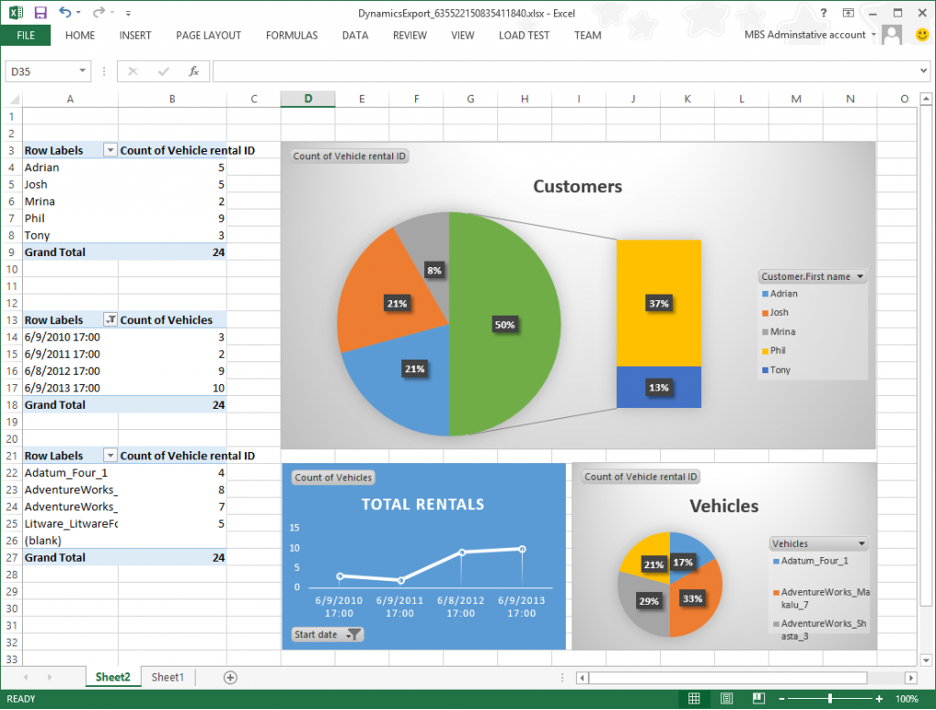
- Excel: Users can export data into Excel with the level of detail they choose, enabling further analysis and tailored presentations.
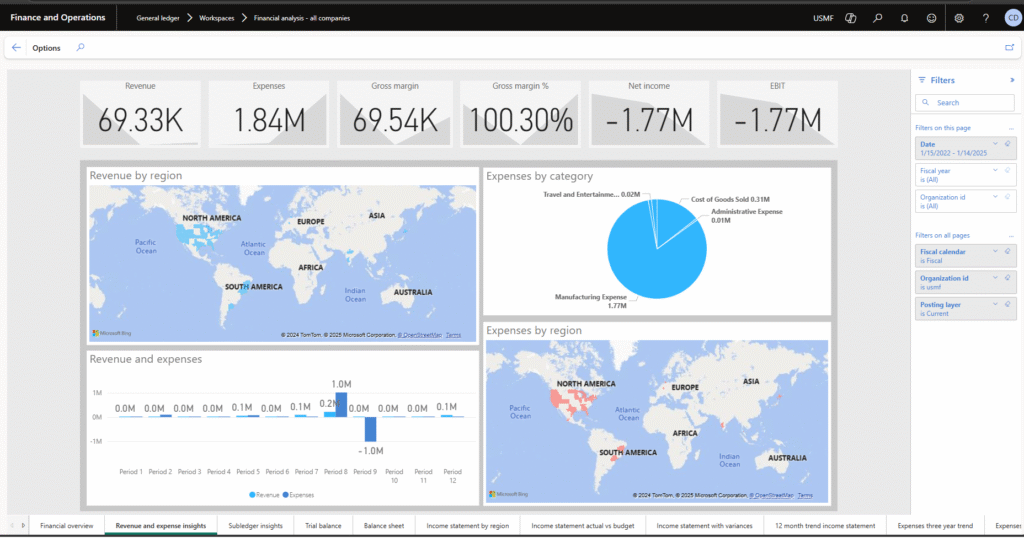
- PowerBI: Leverage PowerBI for enhanced data visualization, insights, and trend analysis. With options to add slicers and filters, businesses can harness dynamic, real-time reports refreshed at user-defined intervals.

5. Out-of-the-box PowerBI workspaces
The “Financial Analysis” workspace is preconfigured with PowerBI to include common financial reports and insights. This standard functionality simplifies adoption and reduces time spent creating complex dashboards from scratch.
6. Drill-through capabilities
What’s behind the numbers? Drill-through functionality lets users go deeper, accessing transaction details with just a click. This level of transparency not only improves understanding but also enhances accountability across teams.

Business Performance Planning (BPP) and Business Performance Analytics (BPA)
Microsoft Dynamics 365 Finance is continually evolving, with additional features being introduced to support financial planning and operational reporting. Business Performance Planning (BPP) for planning and Business Performance Analytics (BPA) for financial and operational reporting are a couple of these advancements.
What is BPP?
Business performance planning addresses the complexities of strategic planning by using Microsoft Power BI and Excel. It streamlines data aggregation, facilitates collaborative workflows, and enables insights with features like real-time data modification, what-if scenario planning, and write-back functionality. Integrated with Dataverse and Microsoft Power Platform, it eliminates manual processes, improves data accuracy, and provides a seamless way to model and act on data. With its intuitive and efficient solution for financial and operational planning, businesses can optimize decision-making, enhance visibility, and transform plans into dynamic actions.
What is BPA?
- Built on PowerBI, BPA gives you more power by offering pre-built dashboards and reports that include filters and adjustment options.
- With consistent refresh intervals, you gain up-to-date information without manual intervention.
- It provides insights comparable to industry leaders like Workday Adaptive Planning and Oracle Hyperion.
Additionally, the integration of Copilot AI within BPP and BPA offers even more intelligence, giving finance professionals a strategic edge in decision-making.
Why Your Business Needs D365 Finance for Reporting
Financial reporting isn’t just a task—it’s a strategic advantage. With Microsoft Dynamics 365 Finance, professionals and business owners can:
- Save time through automation and self-serve options.
- Make better decisions with real-time, drill-down insights.
- Improve accountability through secure, tailored reporting.
- Stay future-ready with BPA and advanced analytics.
Are you ready to transform how your business approaches financial reporting? With Microsoft Dynamics 365 Finance, you can achieve transparency, efficiency, and confidence in your numbers. Boyer and Associates can show you how these powerful tools can streamline your operations and offer actionable insights. It’s time to rethink reporting. Connect with our team today to explore deployment options and take your financial reporting to new heights.