




The sales world isn't just changing—it's being completely reinvented. It feels like every day there’s a new article on AI, and a new tool to learn. Microsoft has been on the AI bandwagon for a while, and their introduction of “sales agents” within their Copilot tool is one that can 10x your sales team’s efficiency if you’re willing to embrace it. Understanding how these AI-powered sales agents can enhance your sales operations is crucial for delivering value-added services and staying competitive in the marketplace. The integration of these sophisticated AI tools is not merely an incremental improvement but a fundamental reimagining of how sales teams operate and engage with prospects.Boyer & Associates has the experts you … [Read more...] about How Microsoft Copilot sales agents are 10x-ing efficiency
How AI is revolutionizing collections in F&SCM
Imagine your collections team transforming overnight from reactive firefighters into strategic financial advisors. That's exactly what's happening as Microsoft Dynamics 365 Finance & Supply Chain Management's (F&SCM) AI-powered collections rewrites the rules of the game. Let's dive into this game-changing innovation that's turning traditional collections wisdom on its head.The old way: collections by intuitionRemember when collections meant spreadsheets, sticky notes, and gut feelings? When your team would:Those days are rapidly becoming ancient history.F&SCM doesn't just track payments—it predicts them. The platform's AI engine acts like a financial fortune teller, analyzing thousands of data points to forecast with remarkable … [Read more...] about How AI is revolutionizing collections in F&SCM
Make every dollar count this Giving Tuesday

Thankfulness and generosity fill the holiday season. If you’re searching for a meaningful place to give this year, you’re not alone.Choosing a worthy recipient can be daunting. There are literally thousands of organizations doing impactful work across the nation. Nearly 30 percent of Boyer’s clients fall under the nonprofit umbrella. We see firsthand how these organizations use Microsoft ERP solutions to maximize every nonprofit donation and track the impact of each program. If you’re considering where to direct your giving this season, below are 10 impactful categories. Each one represents some of the outstanding organizations Boyer has the privilege to support.1 Investing in Tomorrow’s YouthSome children have physical issues … [Read more...] about Make every dollar count this Giving Tuesday
Are you actually using Dynamics 365 AI features?

Top 7 Microsoft AI Tools Not to MissLet's be honest – you've probably heard the AI buzz around Microsoft Dynamics 365, but are you actually leveraging it? If you're still manually forecasting demand or letting your sales team guess which leads are worth pursuing, you're essentially leaving money on the table.The good news? Microsoft has packed Dynamics 365 with some seriously impressive AI capabilities that can transform how your business operates. At Boyer, we've already helped other organizations unlock these features, and the results speak for themselves. Let's dive into the top 7 AI-driven tools you should absolutely use ...1. Copilot: your new business assistantMicrosoft Copilot isn't just another chatbot – it's like … [Read more...] about Are you actually using Dynamics 365 AI features?
Drowning in global financial complexity?

How Microsoft Dynamics 365 F&SCM can be your lifelineAre you constantly putting out fires in your global finance operations? You're not alone. As your business grows, those spreadsheets and disconnected systems that once seemed manageable now feel like they're actively working against you. Every regulatory change triggers a scramble, and every global transaction creates a headache. As for those "real-time insights" your team needs, they’re buried under mountains of processing delays and data silos.Microsoft Dynamics 365 Finance and Supply Chain Management (F&SCM) isn't just another system to add to your tech stack—it's the integrated solution that finally lets you breathe. It tackles your most pressing financial … [Read more...] about Drowning in global financial complexity?
The Real Cost of Disconnected Print Systems: A $50,000 Wake-Up Call
Ever wonder why your print operation feels like it's running uphill even when orders are flowing? You're juggling customer quotes in one system, tracking inventory in another, managing production schedules on spreadsheets, and somehow trying to make sense of profitability across it all. Sound familiar?Here's the uncomfortable truth: those disconnected systems aren't just inconvenient—they're silently draining your bottom line to the tune of tens of thousands of dollars annually. And most print shop owners have no idea how much it's actually costing them. Top industry experts have stated that nearly 40% of North American commercial printers do not have an MIS (Management Information System) in place and often lack accurate job cost … [Read more...] about The Real Cost of Disconnected Print Systems: A $50,000 Wake-Up Call
Why Microsoft partners matter for Dynamics 365 success
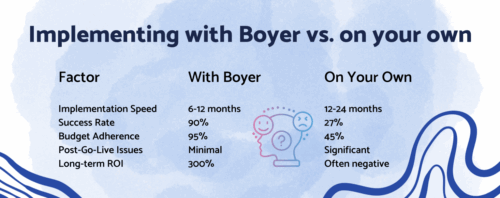
So, you're thinking about jumping into Microsoft Dynamics 365? Maybe FSCM or Business Central? Both are great choices, but getting there can feel like navigating a digital obstacle course full of tech headaches, integration puzzles, and customization curveballs.According to Gartner, roughly 55% to 75% of ERP projects fail to meet their objectives. But here's the secret that changes everything — partnering with an experienced Microsoft partner like Boyer and Associates transforms your journey from a high-risk gamble into a strategic business advantage. The Boyer partnership gives you an advantage beyond just software. With Boyer as your Microsoft partner you get:Deep industry expertiseYour manufacturing company isn't just any … [Read more...] about Why Microsoft partners matter for Dynamics 365 success
Effective Campus Management in Microsoft Dynamics 365 FSCM
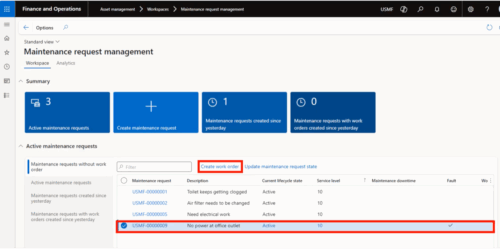
Managing a campus—whether for an educational institution, healthcare center, or corporate facility—is no small feat. With sprawling facilities, diverse needs, and constant demand for operational efficiency, comprehensive campus management has become a necessity rather than a luxury. But how do campuses effectively handle these complexities while maintaining smooth daily operations? Boyer has helped enterprises implement tools like asset management in Microsoft Dynamics 365 Finance and Supply Chain Management (FSCM) to manage their facilities. These solutions bring precision, efficiency, and control to campus operations, ensuring that assets, maintenance tasks, and processes (work orders) are effectively handled. What is campus … [Read more...] about Effective Campus Management in Microsoft Dynamics 365 FSCM
Canada’s AI paradox: Big investment, low literacy

Canada is making massive investments in artificial intelligence, ranking 4th globally with more than $15 billion USD poured into AI over the past decade. We're ahead of Germany, India, Korea and France, a clear signal that our government and private sectors see AI as a strategic priority.But here’s the paradox: we’re investing billions in a technology most Canadians don’t understand or even trust. A 2025 global study reveals that Canada ranks:This disconnect is alarming. We’re betting big on AI to drive productivity, innovation, and competitiveness, yet the public lacks the skills and confidence to adopt it.Why our AI investment mattersAI isn’t just a tech trend. It’s a foundational shift in how … [Read more...] about Canada’s AI paradox: Big investment, low literacy
What’s New in Microsoft Dynamics 365 Finance

September 2025 release delivers improvementsMicrosoft's latest F&SCM update brings AI-powered automation, enhanced visibility, and streamlined workflows that will transform how your finance team operates.Your CFO walks into the leadership meeting with confidence instead of the usual stack of reconciliation reports and exception lists. When the CEO asks about cash flow projections or audit readiness, the answers come easily with real-time data and complete visibility rather than educated guesses and caveats.Yes, it’s possible with Microsoft's September 2025 release for Dynamics 365 Finance (version 10.0.45). This update delivers features that transform routine finance headaches into automated, intelligent workflows. Here’s what you need … [Read more...] about What’s New in Microsoft Dynamics 365 Finance