
Due to the precautions in place as a result of the COVID-19 outbreak, many companies throughout the U.S. are instructing their employees to work from home. Some companies are scrambling to accommodate these changes by purchasing laptops and installing the appropriate business applications for their newly remote employees. In office environments that use Microsoft Dynamics GP, NAV or SL, it is crucial to be deployed in a supported configuration. Here are some helpful tips: If GP, SL or NAV is installed locally on the user’s computer, that computer must be directly connected to the company network via Ethernet (wireless connections are not recommended). If the user is working remotely or is otherwise not able to connect directly to the … [Read more...] about How to set up Dynamics ERP for remote users
Moving Dynamics GP 2015 to the cloud in 1 step
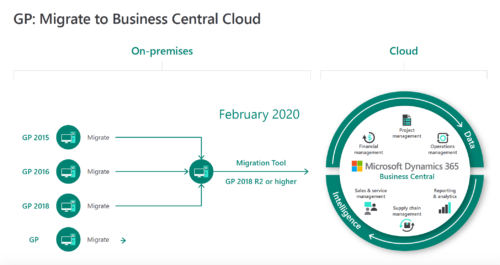
Ever since Microsoft introduced its cloud computing service Azure, the company has ramped up its focus on cloud-based software offerings of all types. From One Drive to Office 365 to Dynamics 365, Microsoft is “all in” with the cloud. That cloud-centered focus extends to its Enterprise Resource Planning (ERP) business management software. Microsoft has invested heavily not only in its one cloud-based ERP offering but also in its migration tools that allow existing on-premise Dynamics ERP users to move to the cloud platform. In its latest wave of Dynamics GP enhancements, Microsoft streamlined the process yet again for Dynamics GP users looking to make the move to Dynamics 365 Business Central in the cloud. The biggest enhancement for … [Read more...] about Moving Dynamics GP 2015 to the cloud in 1 step
New release of Dynamics GP slated for October
A new version of Microsoft Dynamics GP is coming soon — and it promises to have several new features that customers have specifically requested. According to our friends in Fargo, N.D., the latest version will be available Oct. 1. New with this release, the product's name will be simply "Microsoft Dynamics GP" (no date). Here are just a few of the new features we can expect to see: Long description for a Payables TRX Entry printing on checks Document Attach availability in Bank Reconciliation New look to the User Access setup window — plus four new workflows on User Setup Display the user who posted a Journal Entry in the Journal Entry Inquiry window Add a Class ID to a Fixed Asset transfer Get a visual cue for EFT Vendor in … [Read more...] about New release of Dynamics GP slated for October
Dynamics ERP consultant boosts GP support
Boyer & Associates is pleased to welcome Mike Muscarella to our growing Dynamics ERP consulting team. Muscarella’s 20 years of Dynamics GP experience will be put to good use supporting our existing clients. “So far it’s been great. It’s a good team. It’s a lot of smart people, a lot of good people,” he said. Muscarella earned his bachelor’s degree in economics from Southern Methodist University in Dallas, Texas. He started his career as an AP clerk at a now-defunct software company in Dallas. After four years on the accounting side, he decided he was ready for a change of pace. While some people enjoy the routine of accounting, Muscarella said he prefers the constantly-changing work of an ERP consultant. “It’s different companies in … [Read more...] about Dynamics ERP consultant boosts GP support
New ERP support tech joins Boyer consulting team
Laurie Millington joins team as ERP support expert Boyer & Associates is pleased to welcome Laurie Millington to the team as our newest consultant. She will serve as a consultant and ERP support technician for the company’s Microsoft Dynamics solutions. Millington brings a range of experience, including software support and business analysis. She got her start in the 1980s doing data entry for Lutheran Brotherhood. She grew tired of the monotonous work and looking for a challenge, asked a coworker in charge of the computer systems to teach her how to write programs for reports. She was a quick learner and by the time her coworker moved departments, Millington knew enough to take her place. “I kind of learned by trial and … [Read more...] about New ERP support tech joins Boyer consulting team
Getting to know your Dynamics GP support specialist
Got a problem with your Dynamics GP software? Rest assured that when you call Boyer & Associates, you will get excellent support from a fun, friendly face. Dan Moore has served as the company’s Dynamics GP support technician for the last five years and he loves his job. “It’s just something new every day. It seems like no matter how long I’ve been working on this (GP) program, there’s something every day that makes me completely confused, that I haven’t seen before,” Moore said. For Dynamics GP support, November and December are the busiest months, Moore said, with the second half of the year overall being busier than the first half. On the morning of this December interview, Moore had already handled 14 incoming cases by 11 … [Read more...] about Getting to know your Dynamics GP support specialist
Are you getting the most out of your ERP software?
8 signs you’re losing money on your accounting system (and tips to improve) Accountants naturally want to make the most of their resources. Whether it’s choosing the best vendor for paper stock or deciding which software is the best long-term investment, smart choices by the finance team can have a significant effect on the success of a company. How can you tell if you are (or aren’t) using your Enterprise Resource Planning (ERP) software to its optimum potential? Here are 8 signs that you are not getting the most out of your ERP system: 1. You’re on a Microsoft maintenance plan but not upgrading. There’s nothing like wasted money to make an accountant cringe, yet that’s exactly what you’re doing in this case. If you are already paying … [Read more...] about Are you getting the most out of your ERP software?
Dynamics GP Tips & Tricks: User Setup
How to set up a new user in Dynamics GP This post will outline the steps to setting up a new user in Microsoft Dynamics GP and includes a recommendation to make the process a little easier. Note that you might need to be logged into GP as the “sa” (system administrator) user to complete this task. Navigate to Microsoft Dynamics GP menu drop-down >> Tools >> Setup >> System >> User: In the above window enter the User ID and the User Name. The User Type defaults to Full, and the Status is Active. Enter a password in the Password field and then again in the Confirm Password field. Now you have the option to mark the Enforce Password Policy. Doing so will make it so the password entered must meet your domain … [Read more...] about Dynamics GP Tips & Tricks: User Setup
Future of Dynamics GP is strong with Boyer
Earlier this year Microsoft released their roadmap for Dynamics GP. As you can see from the above image, the roadmap shows Microsoft’s commitment to maintaining and improving Dynamics GP through 2019 and beyond. But what does “and beyond” look like for GP, especially with cloud-based Dynamics 365 being released? In 2015 Microsoft announced that there were approximately 47,000 installs for Dynamics GP in the United States. Microsoft has continually stated that with so much interest and demand in GP, they will continue to support and maintain the software. We here at Boyer strongly echo that sentiment. We are fully committed to our clients to help them continue to grow with Dynamics GP. We have a dedicated staff of consultants, developers … [Read more...] about Future of Dynamics GP is strong with Boyer
Why You Need Dynamics GP Workflow 2.0
Are you still using an older version of Microsoft Dynamics GP? Wonder what all the buzz is about “workflow” and upgrades? Marketing coordinator Katie Erickson chatted with Dynamics GP consultant Kelly Peek to learn more about workflow and Dynamics GP 2015. Katie: First, let’s start with the basic question: What exactly is “workflow” for Microsoft Dynamics GP? Kelly: Workflow itself is approval processes. In Dynamics GP, it provides the functionality to create those workflows and the approval process. Clients use it a lot for purchasing because you have levels where people take purchases and another approves those orders and eventually it goes to invoicing. Purchasing is where I see workflow the most. I don’t work with payroll all … [Read more...] about Why You Need Dynamics GP Workflow 2.0